Jumpstart Your KDP Publishing with Editable Notebook Covers
Entering the world of low-content book publishing on Amazon can feel like a massive undertaking. You have the ideas, perhaps even the interior layouts, but the cover design often presents a significant hurdle. A professional-looking cover is the first thing a potential reader sees, and it plays a crucial role in their decision to click and buy. For many aspiring publishers, the design phase becomes a bottleneck, requiring either advanced skills in design software or the budget to hire a freelancer. This is where a resource like the Composition Notebook Covers Bundle for KDP becomes an invaluable asset for your publishing toolkit.
What Exactly is This KDP Cover Bundle?
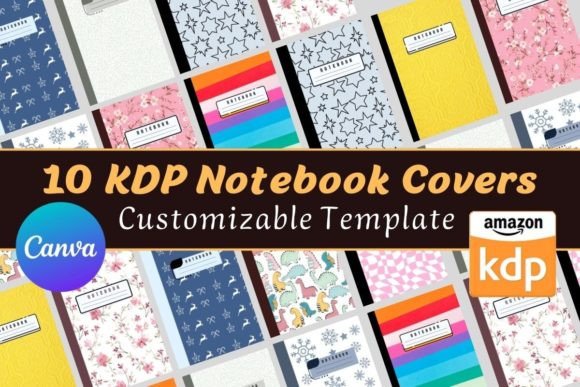
At its core, this product is a collection of ten professionally designed cover templates specifically formatted for Amazon KDP. These aren't just static images you download and use as-is. The real value lies in the fact that each cover comes with a link to an editable template in Canva, the popular and user-friendly online design platform. Think of it as a starting point with a clear path forward. You receive the foundational design—the layout, the typography, the visual elements—and you gain the power to customize it to perfectly match your book's theme or your brand.
The bundle is designed with a standard 6 x 9-inch interior in mind, which is one of the most common and popular sizes for notebooks, journals, and logbooks on the KDP platform. Each template is built for a 120-page book, but the editable nature of the Canva file means you are not locked into that specification. You can adjust the spine width and other elements if your interior page count differs, giving you flexibility for future projects.
Solving the Design Problem for Publishers
The primary challenge this bundle addresses is the design gap. Many great ideas for low-content books—like a gratitude journal, a fitness tracker, or a specialized logbook for a hobby—never make it to market because the creator gets stuck on making a cover that looks good. This bundle removes that barrier. Instead of staring at a blank canvas in a complex design program, you start with a polished, pre-made structure.
This approach is particularly beneficial for beginners who may not have an eye for design principles like font pairing, color theory, or visual hierarchy. The templates are created by someone who understands these concepts, ensuring your final product will look clean, professional, and appealing to your target audience. For the experienced publisher, it’s a time-saver, allowing you to produce multiple book concepts quickly without starting from scratch each time.
Practical Applications and Use Cases
The versatility of a composition notebook style cover makes this bundle widely applicable. The classic "marbled" or "composition" pattern evokes a sense of familiarity and utility, making it suitable for a vast range of topics. Consider these practical examples:
- Academic and Student Use: Create subject-specific notebooks for chemistry, literature, or math. A student is more likely to pick up a notebook that visually represents its purpose.
- Professional Settings: Design meeting logbooks, project trackers, or client intake journals for small businesses, consultants, or freelancers. A branded cover adds a touch of professionalism.
- Hobbies and Lifestyle: Whether it's a gardening journal, a recipe log, a reading diary, or a fitness planner, a themed cover helps users identify the book's function instantly.
- Gifts and Personal Projects: Create a personalized diary or a memory book for a loved one. Editing the title and colors in Canva allows for a truly custom gift.
The key is that the cover acts as a clear signpost. It tells the customer exactly what kind of content to expect inside, which is critical for low-content books where the cover often carries more weight than a traditional novel's cover.
Understanding What You Receive
Clarity is important when purchasing digital products. With this Composition Notebook Covers Bundle, you receive a set of digital files for immediate download. It's crucial to understand that this is a template bundle for the exterior only.
What's Included:
- 10 distinct cover designs.
- Each design is provided in multiple formats: PDF and JPG for quick use.
- A direct link to a fully editable template in Canva for each cover.
What's Not Included:
- The interior pages of the notebook or journal. You are expected to have your own interior content ready to pair with the cover.
- A physical product. This is a digital download only.
The Canva link is the most powerful component. It means you don't need to purchase expensive software. The free version of Canva is perfectly sufficient to make all the necessary edits to the text, colors, and even some graphic elements to make the design your own.
Important Considerations Before You Start
Before diving in, keep a few practical points in mind to ensure a smooth experience. First, have a clear idea of your book's title and subtitle. The main editing you'll do in Canva involves changing the text, so having this ready streamlines the process. Second, consider your target audience. While the composition style is classic, you can use Canva's tools to adjust the color palette to better suit a specific demographic—perhaps softer pastels for a mindfulness journal or bold, dark tones for a professional logbook.
Finally, remember that KDP has specific technical requirements for cover submissions, particularly regarding the bleed area. The templates are designed to be KDP-compliant, but as you edit, ensure you do not move critical text or design elements too close to the edges. Canva provides guides to help you with this. Taking a moment to review Amazon's cover submission guidelines will help you avoid any last-minute issues during the upload process.
Ultimately, this bundle is about efficiency and professionalism. It provides a solid, stylish foundation that empowers you to focus on what truly matters: creating valuable interior content for your readers. By handling the most intimidating part of the process, it allows you to publish more ideas, faster, and with confidence in the quality of your final product.