Mastering the 11 Oz Mug Template: The Essential Guide for Sublimation Creators
The 11 oz ceramic mug is arguably the most ubiquitous canvas in the world of personalized drinkware. From corporate branding to sentimental gifts, these items are a staple for online sellers and crafters alike. However, achieving a professional, high-quality wrap-around design requires more than just artistic talent; it requires precision. This is where the 11 Oz Mug Template becomes an indispensable tool. By utilizing a pre-formatted template, creators can eliminate the guesswork involved in sizing and curvature, ensuring that text remains readable and images are perfectly centered.
This guide explores the utility, features, and practical applications of the sublimation mug template, offering insights into how it streamlines the creative process for everyone from hobbyists to business owners.
Understanding the Purpose of the Template
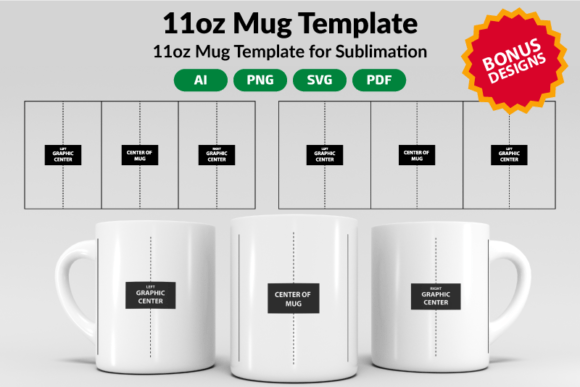
At its core, an 11 Oz Mug Template is a digital guide designed to map the printable surface of a standard ceramic mug. Because a mug is cylindrical, printing a flat image onto it results in distortion. The template accounts for this curvature, providing a safe zone for design placement. It helps users visualize how a flat graphic will wrap around the vessel, ensuring that critical design elements are not lost in the seam or hidden by the handle.
For those utilizing sublimation printing, precision is paramount. Sublimation ink becomes permanent once heat-pressed onto the surface; there are no second chances. A template ensures that your margins are correct, preventing white edges or designs that are too tall for the mug surface.
Key Features and Specifications
Not all mugs are created equal, and neither are templates. A comprehensive template package is designed to be versatile, accommodating different printing techniques and software environments.
Dimensional Variations
While the mug itself holds 11 ounces, the printable area can vary slightly depending on the specific manufacturer or the type of sublimation press being used. Consequently, a robust template package usually includes multiple sizes. Common dimensions include 7.5 x 3.5 inches and 9 x 3.5 inches. The narrower width is often used for designs that need to stay clear of the handle area, while the wider width maximizes the printable surface area for full-wrap designs.
File Format Compatibility
A major hurdle for creators is software compatibility. A high-quality 11 Oz Mug Template package bridges the gap between different design ecosystems. The files typically come in a ZIP file which, once unzipped, reveals a variety of formats. A standard comprehensive pack includes:
- AI Files: Native to Adobe Illustrator, ideal for vector editing.
- SVG Files: The universal language of cutters and web graphics, compatible with Cricut Design Space and Silhouette Studio.
- PDF Files: Accessible on almost any device, great for quick viewing or printing physical guides.
- PNG Files: High-resolution raster images that can be used in Photoshop or as background layers.
This variety ensures that whether a user is operating professional software like Corel Draw or open-source alternatives like Inkscape, the template will function seamlessly. It is also fully compatible with laser engraving software like Glowforge for those looking to etch designs rather than print them.
Who Benefits from Using a Mug Template?
The versatility of the 11 Oz Mug Template makes it valuable to a wide range of users.
Small Business Owners and Etsy Sellers
For e-commerce sellers, consistency is key. When fulfilling orders for wedding favors or corporate merchandise, the design must look identical on every mug. Templates allow for batch processing of designs, ensuring that the text is always level and the margins are uniform. This professional finish increases customer satisfaction and reduces waste from misprinted products.
Hobbyists and DIY Enthusiasts
For the home crafter, templates reduce the learning curve. Instead of spending hours measuring and trial-and-erroring with paper cutouts, a hobbyist can download a template, drag and drop their photo, and have a print-ready file in minutes. This is particularly helpful for those using Cricut Design Space or Silhouette Studio, where working with exact dimensions is crucial.
Graphic Designers
Designers creating assets for clients can use the template to create realistic mockups. By placing a design into the template, they can show the client exactly how the final product will look, managing expectations and streamlining the approval process.
Practical Application: How to Use the Template
Using an 11 Oz Mug Template is a straightforward process, but following specific steps ensures the best results.
- Download and Unzip: After purchase, the user receives a ZIP file. This must be unzipped to access the individual file formats.
- Select the Correct Size: Measure the specific sublimation mug being used to determine if the 7.5" or 9" width is appropriate.
- Import into Design Software: Open the appropriate file (e.g., SVG for Inkscape) in your preferred program.
- Lock and Design: Lock the template layer so it cannot be moved. Create a new layer on top for your artwork.
- Placement: Place your imagery within the guide lines. Avoid placing critical text near the very edges where the curvature increases distortion.
- Export: Once the design is complete, hide or delete the template layer and export the final image for printing.
Evaluating Strengths and Limitations
While the 11 Oz Mug Template is a powerful asset, it is important to understand its scope.
Strengths
- Time Efficiency: Drastically reduces setup time compared to manual measurements.
- Cost-Effective: Prevents material waste caused by incorrect sizing.
- Versatility: Compatible with a vast array of software platforms, from professional suites to beginner-friendly apps.
- Instant Access: As a digital product, it is available immediately after purchase. There is no shipping wait time.
Considerations
Users must remember that a template is a guide, not a guarantee of print quality. The final output still depends on the quality of the sublimation printer, the ink, and the heat press settings. Additionally, while templates provide standard dimensions, slight variations exist between mug manufacturers. It is always advisable to print a test design on plain paper first to check the fit against the physical mug before using expensive sublimation paper.
Real-World Scenarios
Imagine a scenario where a local coffee shop wants to launch a line of branded mugs. Using an 11 Oz Mug Template, the shop owner can take their logo, add the shop's tagline, and ensure the design wraps perfectly around the mug without the text touching the handle. The template allows them to create a "safe zone" mockup to show the printer.
In another scenario, a parent wants to create a "World's Best Dad" mug for a birthday gift. They have a favorite family photo but are unsure how it will look cropped onto a cylinder. By placing the photo into the template, they can adjust the crop to ensure all family members' faces are visible and not distorted by the curve of the mug.
Conclusion
The 11 Oz Mug Template is more than just a digital outline; it is a bridge between imagination and production. By providing precise dimensions, compatibility with major design software, and ease of use, it empowers creators to produce professional-grade sublimation products. Whether you are a seasoned graphic designer using Adobe Illustrator or a hobbyist crafting in Cricut Design Space, this tool is essential for anyone serious about the quality of their personalized drinkware.